Seamless Event Ticketing

Create and sell tickets for events effortlessly

The modern platform for event organizers and attendees. Create events, manage tickets, and deliver unforgettable experiences.

Create Event

Trusted by event organizers worldwide

Concert Crowd

10K+

Tickets Sold

Why Smoothtickets?

Features that make hosting easy

Everything you need to create, manage, and sell tickets for your events in one place

Quick Setup

Create and launch your event in minutes with our intuitive interface

Secure Payments

Accept payments safely with industry-leading security standards

Real-time Analytics

Track ticket sales and attendance with live dashboard updates

Custom Pricing

Set multiple ticket tiers with flexible pricing options

Email Confirmations

Automatic ticket delivery and confirmation emails to attendees

QR Code Entry

Seamless check-in with scannable QR codes for fast entry

Simple Process

How Smoothtickets Works

Four simple steps to create, manage, and sell tickets for your events

01

Create Your Event

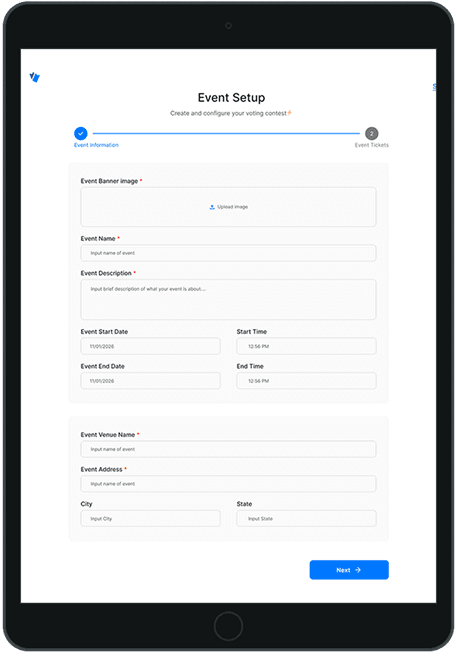
Set up your event in minutes with our intuitive form. Add all the details, upload images, and customize your event page.

02

Set Ticket Pricing

Create multiple ticket tiers with flexible pricing. Set quantities, early bird discounts, and VIP options.

03

Attendees Purchase

Customers browse your event, select tickets, and complete secure checkout with just a few clicks.

04

Instant Confirmation

Tickets are delivered instantly via email with unique QR codes. Attendees can access tickets anytime on their devices.

Complete Event Lifecycle

For Hosts

Create events, set pricing, manage attendees, and track analytics in real-time

For Attendees

Browse events, purchase tickets securely, and receive instant digital tickets

Event Day

Fast check-in with QR codes, live attendance tracking, and seamless entry management

Platform Features

Powerful Tools for Event Success

Explore the features that make Smoothtickets the preferred choice for event organizers

Event Creation Dashboard
Feature 1

Event Creation Dashboard

Intuitive interface to create and customize your events. Add rich descriptions, upload images, set dates, and configure all event details in one place.

Easy-to-use form builder
Image upload & gallery
Multiple event categories
Custom event URLs
Feature 2

Flexible Ticket Pricing

Set up multiple ticket tiers with different pricing options. Create early bird specials, VIP packages, group discounts, and more to maximize your revenue.

Unlimited ticket tiers
Dynamic pricing options
Quantity limits per tier
Revenue tracking
Flexible Ticket Pricing
Real-Time Analytics
Feature 3

Real-Time Analytics

Track your event performance with comprehensive analytics. Monitor ticket sales, revenue, attendee demographics, and peak purchase times all in one dashboard.

Live sales tracking
Revenue reports
Attendee insights
Export capabilities
Feature 4

Mobile-Friendly Experience

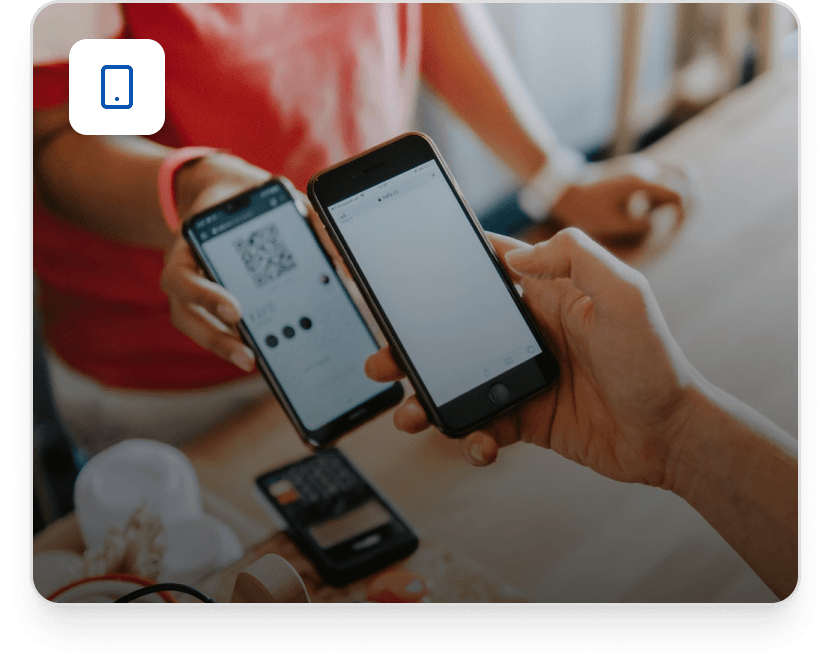
Both hosts and attendees enjoy a seamless mobile experience. Manage events on-the-go and let customers purchase tickets from any device.

Responsive design
Mobile wallet support
QR code scanning
Offline ticket access
Mobile-Friendly Experience

Everything You Need in One Platform

From creation to check-in, Smoothtickets handles every aspect of your event management

99.9%
Uptime
<2min
Setup Time
24/7
Support
100%
Secure
Help Center

Frequently Asked Questions

Everything you need to know about Smoothtickets

How can I create an event on Smooth Tickets?

Creating an event on Smooth Tickets is quick and easy! Just follow these steps:

  • Sign in or Sign up: Go to Smooth Tickets and log in with your account. If you don’t have an account yet, simply sign up with your email or social login.
  • Navigate to the Dashboard: Once logged in, access your Event Dashboard from the main menu.
  • Click “Create Event”: Look for the “Create Event” button and click it to start.
  • Enter Your Event Details:
    • Event Name: Give your event a clear title.
    • Date & Time: Set when the event starts and ends.
    • Location: Add the venue address or choose “Online” for virtual events.
    • Description & Images: Write a compelling description and upload event visuals to attract attendees.
  • Set Ticket Types & Prices: Create ticket categories (e.g., General, VIP, Early Bird). Enter prices, quantities and sales start/end dates for each ticket type.
  • Publish Your Event: Review all details. Hit “Publish” and your event is live!
  • Share & Promote: Copy your event link and share it with your audience on socials, email, or messaging apps.
What fee does Smooth Tickets charge?

Smooth Tickets charges transparent service fees to help power and maintain the platform including secure checkout, ticket delivery and event support. How it works:

  • Service Fee (Paid by Attendees): A small service fee is added to each ticket purchased on Smooth Tickets. This fee covers payment processing, platform support and smooth checkout experiences. The exact amount or percentage is shown before checkout, so buyers always know what they’re paying.
  • Event Organizer Fee: For event organizers, SmoothTickets may charge a platform fee per ticket sold or a flat event service fee, depending on your pricing plan or agreement with SmoothTickets. This fee is automatically deducted from your ticket revenue so you don’t need to calculate anything manually.
  • No Hidden Charges: All fees are clearly displayed to both organizers and attendees during setup and at checkout. You only pay for what’s visible, no surprises.
Tip: If your event has sponsors or budget flexibility, you can absorb part or all of the service fee to offer lower ticket prices for your guests.
How do attendees receive their tickets?

When someone buys a ticket on SmoothTickets, they receive it instantly and securely in a way that’s easy to access and use.

  • Email Delivery:
    • After purchase, the attendee gets a ticket confirmation email containing the ticket(s).
    • The ticket usually includes a unique QR code that’s used for entry.
  • Download from Order Page:
    • Once the purchase is complete, attendees are taken to a “Thank You” page where they can download their tickets as PDF or add them to their phone.
  • SMS Delivery (If Selected):
    • For convenience, an SMS with the ticket link or QR code may also be sent if the attendee provides a phone number at checkout (depending on settings).
Important: Each ticket has a unique code to prevent duplication. Attendees should save their tickets or have them ready on their phone for quick scanning at the event entrance.
How do organisers scan tickets at the entrance?

SmoothTickets makes entry management fast and secure with a simple ticket-scanning process:

  • Access the Organiser Dashboard: Log in to your Smooth Tickets account. Open the event you’re managing and navigate to Check-In / Ticket Scanning.
  • Use the Scanning Tool: Organisers can scan tickets using the Smooth Tickets scanning feature on a smartphone or tablet. The scanner reads the QR code on each ticket.
  • Instant Validation: Once scanned, the system instantly shows whether the ticket is valid, already used or invalid. This helps prevent duplicate entries and fraud.
  • Offline Scanning (If Enabled): For venues with poor internet access, SmoothTickets may allow offline scanning, which syncs automatically once the device is back online.
  • Real-Time Attendance Tracking: As tickets are scanned, organisers can see live attendance numbers from their dashboard.
Tip for Organisers: Ensure your staff have charged devices and are logged in before gates open to avoid delays.
Can I set up multiple ticket types for one event?

Yes, you can create multiple ticket types for a single event on SmoothTickets! This gives you flexibility to offer different ticket options based on price, access level, or perks.

Examples of Ticket Types You Can Create:

  • Regular – Standard entry
  • VIP – Premium access or perks
  • Early Bird – Discounted tickets for early buyers
  • Group / Bundled Tickets – For multiple attendees in one purchase

You can name it as it suits your theme.

Customize Each Ticket Type:

  • Price: Set a unique price for each ticket type
  • Quantity: Control how many of each ticket type are available
  • Sales Dates: Choose when sales open and close for each type
  • Descriptions: Add details or benefits specific to each ticket

How to Add Them When Creating or Editing an Event:

  1. Go to the Tickets section
  2. Click “Add Ticket Type”
  3. Fill in the details for that ticket
  4. Repeat to add as many types as you need
Can I limit how many tickets one person can buy?

Yes. SmoothTickets allows organizers to set purchase limits per attendee to ensure fair access and prevent ticket hoarding.

  • You can define the minimum and maximum number of tickets a single buyer can purchase per ticket type.
  • Limits can be different for each ticket category (e.g., max 2 VIP tickets, max 5 Regular tickets).
  • Once the limit is reached, buyers won’t be able to add more tickets during checkout.

Why this helps:

  • Prevents bulk buying by resellers
  • Gives more people a chance to attend
  • Helps you control crowd size effectively
Can I hide or restrict certain ticket types?

Yes. SmoothTickets lets you control the visibility of ticket types based on your event strategy. You can:

  • Hide tickets from public view (useful for invite-only or internal sales)
  • Schedule ticket availability (e.g., Early Bird tickets automatically disappear after a set date)
  • Share private ticket links for special guests, sponsors, or partners.

Common use cases:

  • Selling VIP or Sponsor tickets privately
  • Releasing tickets in phases
  • Creating exclusive access for select audiences
How do payouts to organizers work?

Smooth Tickets makes it easy and transparent for organizers to receive their ticket sales revenue. Here’s how payouts work:

  • Ticket Sales Collection: When attendees buy tickets, payments are securely processed through SmoothTickets. All ticket revenue is tracked in real time on your Organizer Dashboard.
  • Fee Deduction: Applicable platform and payment processing fees are automatically deducted. You don’t need to calculate or remove fees manually.
  • Payout Schedule: Payouts are sent to the bank account provided by the organizer. Depending on your event settings, payouts may be after the event or in scheduled batches (e.g., weekly or milestone-based).
  • Payout Confirmation: Once a payout is processed, you’ll receive a notification and payout summary showing total ticket sales, fees deducted, and net amount paid out.
  • Full Transparency: Organizers can view sales history, payout status and reports directly from their dashboard at any time.
Important Notes: Ensure your bank details are correctly added and verified to avoid payout delays. Payout timelines may vary slightly based on bank processing times.
Can attendees get refunds?

Yes. SmoothTickets supports refunds and ticket transfers but the availability depends on the event organizer’s settings.

Refunds

Refunds are controlled by the event organizer, not automatically issued.

Organizers can choose to:

  • Allow refunds up to a specific date
  • Offer partial or full refunds
  • Mark tickets as non-refundable

If a refund is approved, the amount is processed back to the original payment method, excluding any non-refundable service fees (where applicable).

Attendees are encouraged to review the event refund policy before completing their purchase.

Still have questions?

Ready to host your next event?

Join thousands of event organizers using Smoothtickets to create memorable experiences

Create Your First Event